I’ll be honest, I didn’t know this feature existed until about two months ago. And I’ve worn an Apple Watch every day for three years.
Here’s what happened. I went to see Dune: Part Two with a friend. Dark theater, big screen, the whole thing.
About 20 minutes in, I reached for my popcorn, and my watch lit up like a tiny flashlight on my wrist. My friend gave me the look. You know the one.
I felt like an idiot. I had put my phone on silent. I had even turned on Do Not Disturb. But my watch still betrayed me.
Turns out, I was doing it wrong. There’s a setting called Theater Mode that solves this completely. And if you don’t know about it, you’re missing out on one of the most practical features Apple has ever put on this thing.
What Actually Is Theater Mode?
Theater Mode does two things at once. First, it turns on Silent Mode, so your watch won’t make noise. Second, and this is the important part, it disables the “raise to wake” feature. That means when you lift your wrist to grab a drink, adjust your seat, or check if your phone buzzed, the screen stays completely dark.
Even if you have an Apple Watch with the always-on display, Theater Mode overrides it. The screen goes black and stays black until you deliberately wake it.
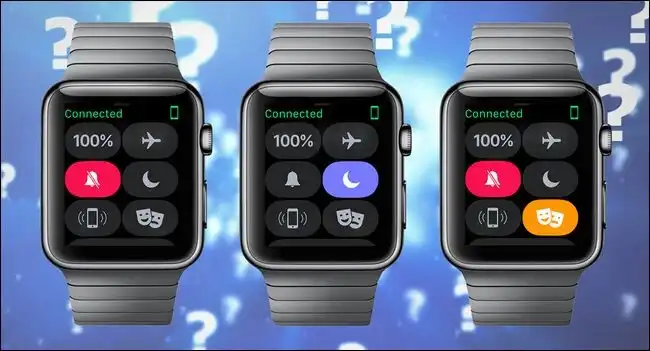
The icon for it is two theater masks, one smiling and one crying. I used to think that was some kind of mood tracker. Nope. It’s literally for the movies.
Why Silent Mode Isn’t Enough
The problem with Silent Mode alone is that it stops the sound, but it doesn’t stop the light. Your watch will still light up every time you move your wrist. In a dark theater, that’s just as annoying as a ringing phone. Maybe worse, because it keeps happening every time you shift in your seat.
This actually reminds me of a similar Apple setting that most people get wrong. I wrote about it a while back: how Prioritize Faster Shooting can make your iPhone photos look blurry without you realizing it. Same pattern. A default that works fine 90% of the time, but in a specific situation it backfires, and nobody tells you there’s a better way.
Theater Mode is that better way for the movies.
What About Do Not Disturb?
Some people use Do Not Disturb or Focus modes instead. I used to do this too. And honestly? It helps a little. It reduces notifications, so your watch isn’t vibrating every two seconds.
But there are two problems.
First, Do Not Disturb doesn’t always block everything. If you’ve set certain contacts or apps to bypass it, like your partner or work messages, those will still come through. And when they do, your watch lights up.
Second, and this is the bigger issue, Do Not Disturb does not turn off raise to wake. Your screen still lights up when you move your wrist. So you’re back to square one.
How to Turn It On (It Takes Two Seconds)
Here’s the good part. You don’t need to dig through Settings.
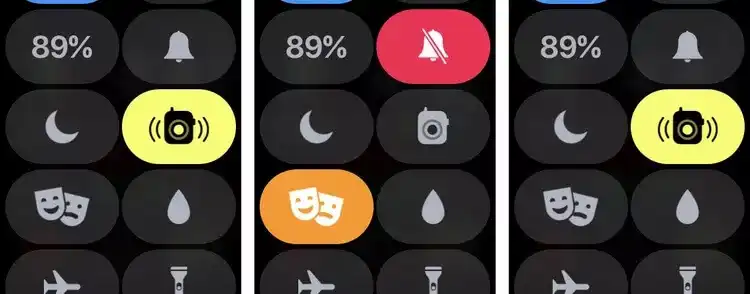
Press the side button on your Apple Watch, the one below the Digital Crown. That opens Control Center. Look for the two masks icon. Tap it.
That’s it. The screen goes dark. An orange icon appears at the top of your watch face so you know it’s on.
To turn it off? Same thing. Press the side button, tap the masks icon again.
How Do You Check the Time?
This was my first question too. If the screen doesn’t wake when I lift my wrist, how do I see anything?
You tap the screen. Or press the side button. Or turn the Digital Crown. The screen wakes up when you intentionally interact with it, not when you just move your arm.
After a few seconds, it goes dark again. No fuss, no bright flash in someone’s peripheral vision.
Where Else I Use It
Okay, the name says “Theater Mode.” But honestly? I use it in way more places than the cinema.
Concerts and live shows: same problem, dark venue, lots of arm movement.
Meetings and presentations: keeps your watch from being a distraction when you’re presenting or in a quiet room.
Photography: if you’re shooting in low light, the last thing you want is your watch lighting up and ruining your night vision.
Putting a kid to sleep: I’ve used this while rocking my nephew. No bright screen to wake him up.
Sleeping: even if you don’t use sleep tracking, this stops the watch from lighting up when you roll over.
I’m not saying it’s life-changing. But it’s one of those small things that makes a surprisingly big difference once you know about it.
One Thing to Watch Out For
Theater Mode does turn off your Walkie-Talkie status. So if you use that feature, just know it won’t be available while Theater Mode is on.
Also, you’ll still get haptic notifications, the little taps on your wrist. So you’re not completely cut off. You just won’t see the screen light up.
Should You Use It?
I wish I had known about this years ago. It would have saved me from a lot of awkward moments in dark rooms.
If you go to the movies, if you sit in meetings, if you ever find yourself in a dark room where a glowing watch screen would be annoying, turn on Theater Mode. It takes two seconds. It’s free. And it works exactly like it should.
The battery cost is basically nothing, and you can flip it off just as fast if you change your mind. There’s no downside I’ve found yet.
I’ll keep using it. Probably more often than I’d like to admit.
By the way, I also wrote about something even weirder that Apple’s code just revealed: AirPods with built-in cameras. It sounds crazy, but it’s apparently real. Worth a read if you’re curious about where Apple is heading next.