I’ve been running a SATA SSD in my gaming rig for years. Never thought much about it. It loads games fast enough, or so I told myself. Then I started seeing NVMe drives drop in price. Gen4 ones. The kind that promise 7,000 MB/s read speeds. My SATA drive does about 550 MB/s. That’s a 12x difference on paper. So I figured I must be missing out, right?
Wrong. Or at least, that’s what the data says.
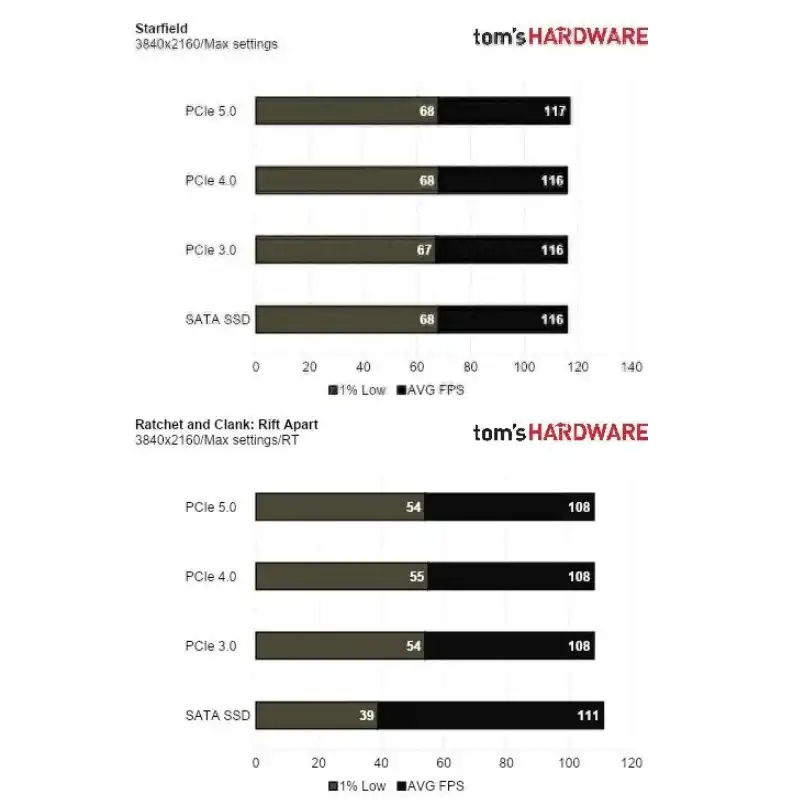
Tom’s Hardware ran a massive gaming performance test on Windows 11 last week. They wanted to see if SATA SSDs and NVMe drives actually perform differently in real games. Not synthetic benchmarks. Not CrystalDiskMark numbers that look impressive but mean nothing when you’re actually playing. Real gameplay. Loading screens, texture streaming, frame rates, the whole package.
The results? Honestly? They surprised me.
Most Games Run the Same
Here’s the short version. In the vast majority of games, SATA and NVMe drives deliver almost identical performance. We’re talking about games like Alan Wake 2 and Starfield, two of the most demanding titles you can throw at a PC right now. Alan Wake 2 pushes real-time ray tracing hard. Starfield has this massive open world that streams data constantly as you move around. If any games would expose a storage bottleneck, it’s these two.
And they didn’t.
Load times were close. Frame rates were nearly identical. You couldn’t tell which drive was which in a blind test. I’m not kidding. The kind of difference you’d see on paper, 7,000 MB/s versus 550 MB/s, just didn’t translate into anything you could actually feel while playing.
So if you’re a regular gamer playing normal games, a SATA SSD is totally fine. You don’t need that fancy Gen4 NVMe drive. Save your money.
I want to be careful here, because this is the part people get wrong. The marketing around NVMe is all about the big sequential read number. That number matters for moving huge files, for video editing, for unpacking game installs. It barely matters for actually running a game once it’s loaded. Game engines don’t read the whole asset library at once. They stream small chunks, and both drive types are more than fast enough for that. So the headline speed gap is real on a spec sheet and nearly invisible on your desk.
But Here’s Where It Gets Interesting
Then there’s the other side of the test. Two games changed everything: Forspoken and Ratchet and Clank: Rift Apart. Both support DirectStorage.
If you haven’t heard of DirectStorage, it’s a Microsoft technology that lets games load assets directly from your SSD to your GPU, bypassing the CPU. Think of it as a fast lane for game data. No detours. No traffic jams. Just straight to where it needs to go.
In these two games, NVMe drives absolutely crushed SATA drives. But here’s the part that really got me. Average frame rates were basically the same. Wait, what?
The 1% Low Frame Rate Is the Real Story
The difference showed up in the 1% low frame rates. That’s a measure of how bad your worst frame drops are. You know when a game stutters for a split second during an intense scene? That’s what 1% lows measure. The SATA drives stuttered. A lot. The NVMe drives didn’t.
So on paper, both drives looked like they were running at 60 FPS. But the SATA drive had these micro-stutters that made the game feel less smooth. The NVMe drive just ran. No hiccups. No drops. Just consistent performance.
That’s the DirectStorage effect. When a game is optimized to use it, the faster speeds of NVMe actually matter. Not for average FPS. For consistency.
This is the nuance that gets lost in most upgrade advice. People shop for average frame rate because that’s the number reviewers print. But the number that ruins a good session is the stutter, the hitch when a new area loads, the brief freeze when the boss fight kicks off. If you mostly play older titles or games that don’t use DirectStorage, you’ll never see that gap. If you play the few that do, the faster drive quietly earns its keep every time the screen would otherwise hitch.
So What Does This Mean for You?
Two things.
First: if you mostly play mainstream games, buy a SATA SSD. It’s cheaper. It works great. You won’t notice the difference.
Second: if you play games that support DirectStorage, and more will in the future, NVMe starts to make sense. That’s where the extra speed actually translates into a better experience.
But here’s the catch. DirectStorage isn’t everywhere yet. It’s still relatively new. Most games don’t use it. So paying extra for NVMe right now is basically future-proofing. You’re buying for what might come, not what’s already here.
I’ve run into Windows gaming quirks before. For instance, I had a weird issue where a Windows 11 update actually broke my games, and it turned out to be RGB lighting software fighting for resources. I wrote about that one here. And another time, the same update caused broader game crashes, and I shared some fixes in this post.
Those were software conflicts, not hardware limits. This SSD test is different. It’s about hardware finally catching up to what the software can do. Both stories, though, point to the same thing: Windows gaming is complicated, and the bottlenecks aren’t always where you expect them.
A practical tip if you’re on the fence. Check the storage requirements on the games you actually play before you spend. A game that lists DirectStorage as a feature is a real signal that an NVMe drive will help. A game that doesn’t mention it probably won’t care what you plug in. Don’t buy the drive because of the spec sheet. Buy it because a specific game you love will run smoother.
Would I Upgrade?
Here’s where I land. I’m keeping my SATA drive for now. DirectStorage needs more adoption before it becomes a must-have. And honestly, most games I play don’t support it yet. When that changes, maybe in a year or two, I’ll look at NVMe again.
If you’re building a new PC today, get an NVMe drive. The price difference isn’t huge anymore, and you’ll be set for when DirectStorage becomes mainstream. But if you already have a SATA SSD and it’s working fine, don’t rush to upgrade. You’re not missing as much as the marketing wants you to believe. Same logic applies to old phones, mine does more as a router than it ever did in a drawer.
That’s where I landed. We’ll see what happens when more games adopt DirectStorage.