I’ll be honest, I didn’t expect much when I saw the announcement.
Another vision model. Another API endpoint. Another “exp” tag that usually means “try it if you’re bored.”
But then I actually read what this thing does. And I spent a couple hours poking at it. Now I’m sitting here writing this, which means it got my attention.
Here’s what happened.
DeepSeek dropped V4-Flash-Vision-Exp on their API platform today. It’s an experimental multimodal model, vision plus text in one package. You access it by setting model='deepseek-v4-flash-vision-exp' in your API calls. Simple enough.
The bigger news? Files API is also live now. Free. You upload an image once, reference it by file_id in multiple requests. No more re-uploading the same screenshot twenty times. That alone saves a surprising amount of hassle.
What I Was Testing
I don’t run benchmarks for fun. I care about one thing: does this actually help me do stuff faster?
But I did look at their numbers. And the story there is interesting. The short version: it keeps up on text, and it pulls ahead the moment an image enters the picture.
On pure text tasks, agent stuff and reasoning and world knowledge, the vision model holds its ground against the regular V4-Flash. Same level. No drop-off. That’s not nothing.
Usually when you add vision, something else gives. Here it didn’t.
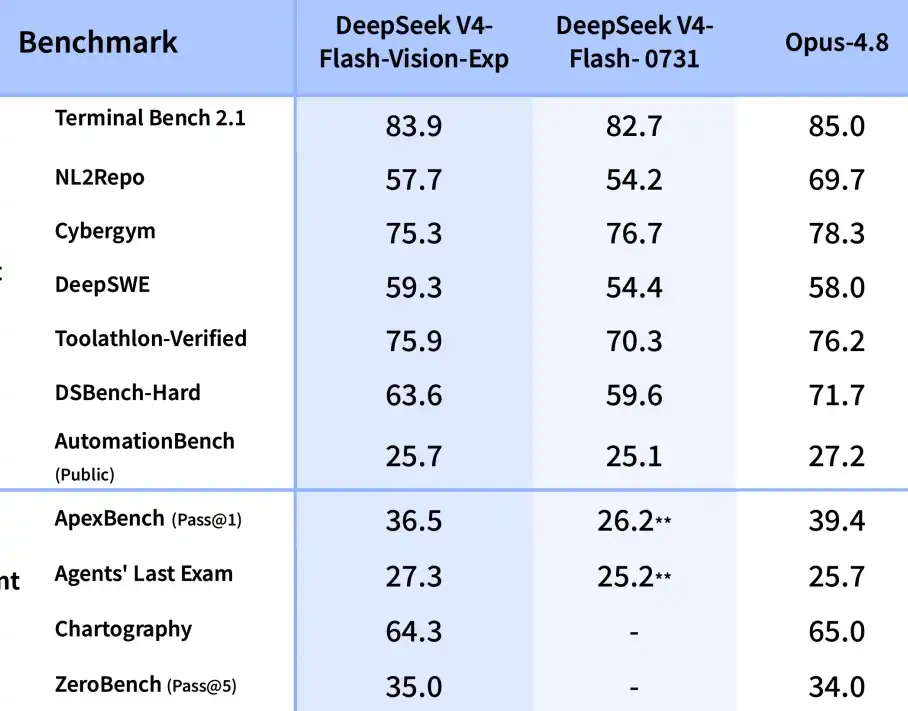
Where it actually shines is the multimodal agent benchmarks. Think tasks where the model has to look at a chart, understand a screenshot, or navigate a UI to complete a workflow. On those, V4-Flash-Vision-Exp jumps way ahead of the text-only version. And it’s sitting close to Opus-4.8 on some of these tests.
Wait, I should have said this earlier: Opus-4.8 is Anthropic’s top-tier model. So we’re talking about a vision-enabled model from DeepSeek that’s knocking on that door. For an “exp” release. That’s not bad.
Now, the benchmark numbers:
- On Terminal Bench 2.1: 83.9 vs 82.7 (text-only). Slight edge.
- On Toolathlon-Verified: 75.9 vs 70.3. That’s a meaningful bump.
- On ApexBench: 36.5 vs 26.2. That one’s big. Almost 10 points.
What does that translate to in real use? Hard to say exactly. But it suggests the model handles tasks that require both seeing and acting more effectively. Like, you show it a dashboard error and ask it to fix the underlying issue. Or you give it a UI mockup and tell it to generate the code. That kind of thing.
The API Stuff That Actually Matters
Let’s cut the fluff. Here’s what you need to know if you’re actually going to use this.
Image pricing: images get converted to tokens. Max 384 tokens per image. Same price as text tokens for V4-Flash. So a vision call doesn’t cost you extra beyond the token count. That’s fair.
Three ways to pass images: base64 inline, external URL, or the new Files API. The Files API is the one I’d use. Upload once, reference many times. Works across Chat Completions, Messages, and Responses endpoints.
One thing that caught me off guard: the model handles mixed text and image inputs. So you can send a long prompt with images interspersed. Like “look at this chart, now read this error log, now tell me what’s wrong.” It processes everything together.
I tried this with a messy screenshot of a terminal error and a separate config file. It connected the dots. Not perfectly, but close enough that I didn’t have to spell out every detail.
Honestly? The vision part is good. But I’m more interested in what this enables for agent workflows. DeepSeek clearly thinks so too. They shipped an open-source harness for exactly that.
Think about it. Most agents today are text-only. They read logs, they parse code, they respond with text. That’s fine for a lot of things. But there are so many tasks where you need to see something, a graph or a UI or a photo of a whiteboard, to actually understand the context.
This model closes that gap. It’s not perfect. It hallucinates on complex charts sometimes. I gave it a crowded bar chart and it misread two data points. But for straightforward visual tasks? It works.
I used it to debug a frontend issue yesterday. Took a screenshot of a broken layout, fed it to the model alongside the component code. It spotted a missing CSS property I’d overlooked. Took maybe two minutes. Would’ve taken me ten to trace manually.
That’s the kind of thing that makes me pay attention.
What’s Missing
Not everything is roses.
It’s still experimental. The “exp” tag means things could change. Edge cases break. I had one request where the model just refused to acknowledge an image, treated it like it wasn’t there.
No error, no warning, just text-only output. Happened once out of maybe thirty tries. But it happened.
Also, the vision capabilities are good but not mind-blowing. Don’t expect it to describe every pixel. It gets the gist, not the granular detail. For parsing visual information, it’s solid. For artistic analysis or fine-grained object recognition, probably not your tool.
And the benchmark score on Agents’ Last Exam? 27.3. That’s better than the text-only version’s 25.2, but it’s not a leap. Still room to grow.
The Short Version
If you’re building agents that need to see, this is worth trying. The vision integration is smooth, pricing is fair, and the performance bump on visual benchmarks is real. It’s not going to replace Claude overnight. But it’s competitive in a way that surprises me. I spent more time with the cheap version of this model, and the value story is different than the benchmarks suggest.
For text-only use? Stick with V4-Flash. The vision model matches it, not surpasses it.
But if you have workflows where “seeing” the input makes a difference, UI testing or chart analysis or screenshot-based debugging, this is a solid option. And the Files API makes it genuinely convenient to use.
I’ll keep poking at it this week and see where it actually fits. Might switch over for certain tasks. Might not for others.
We’ll see.
If you’re dealing with visual data in your agent workflows, this is worth a shot. The price is right and the integration is clean. Just don’t expect perfection. It’s still an “exp” model.